For After Effects & Premiere

From your audio to finished captions in minutes, in your timeline. 330+ presets in After Effects, 80+ in Premiere.

Adobe After Effects 2026
MotionCaption
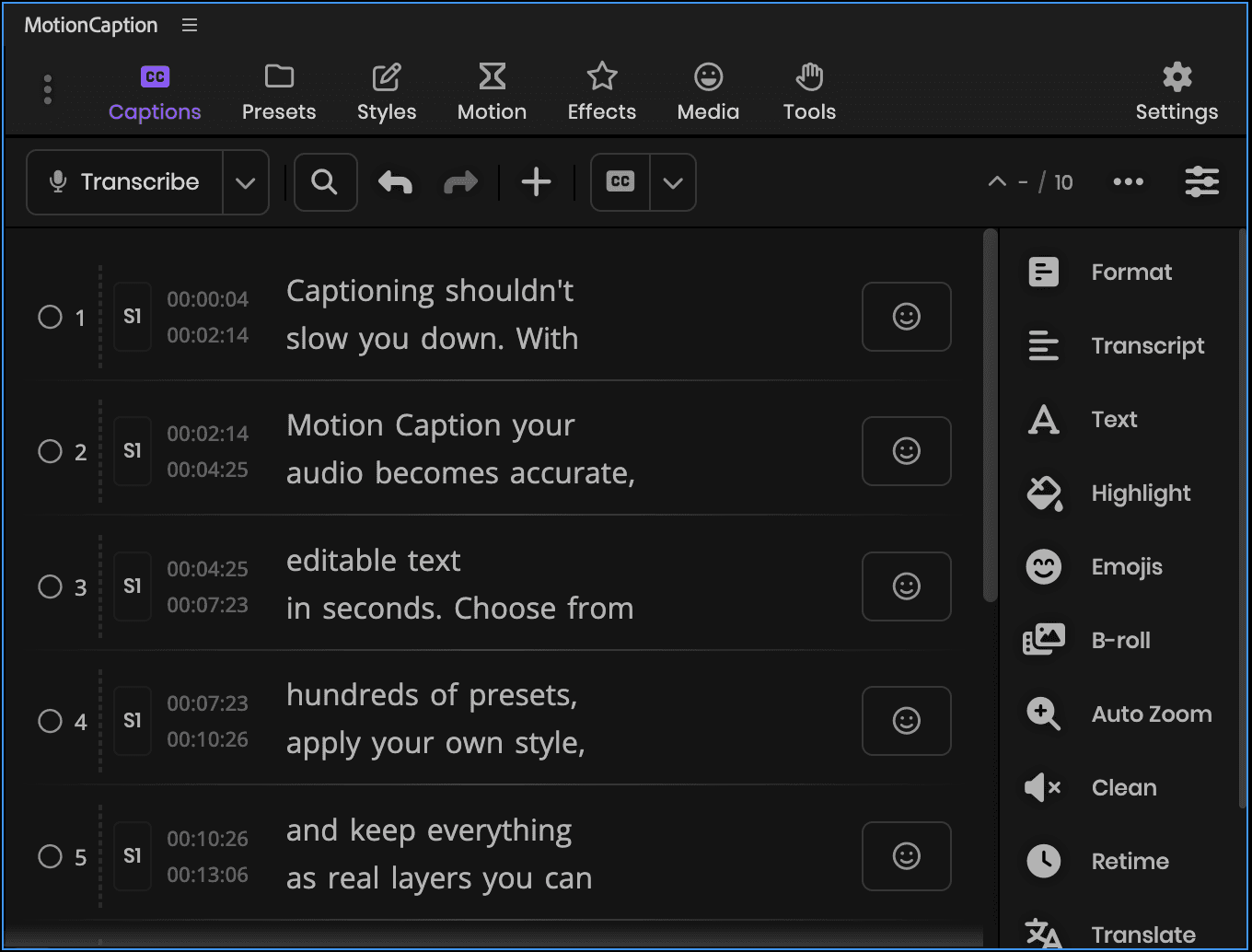
Transcribe
7 / 7
1S1
00:00:0200:00:27

Captioning
shouldn't be hard

2S1
00:02:0800:04:05

With Motion Caption,
your audio becomes

3S1
00:04:2700:05:26

native text layers
in After Effects

4S1
00:07:0500:08:08

Choose from
hundreds of presets

5S1
00:10:2800:12:25

then restyle any word
whenever you want

6S1
00:14:0400:16:19

A faster, cleaner
way to caption

7S1
00:16:2000:18:00

without leaving
your timeline

FormatTranscriptTextHighlightEmojisB-rollAuto ZoomCleanRetimeTranslateChaptersPost
Format Captions
Lines2
Chars per line23
Min chars per line0
Pause gap0,3
Show more
Comp 100;00;00
Comp 1Render Queue
00;00;00(29.97 fps)
Source Namemotioncaption.mp3Waveform
0s03s06s09s12s15s18s
Compatible with
Adobe After Effects
After Effects
2023 and later
Adobe Premiere
Premiere
2023 and later
Windows & macOS
Desktop
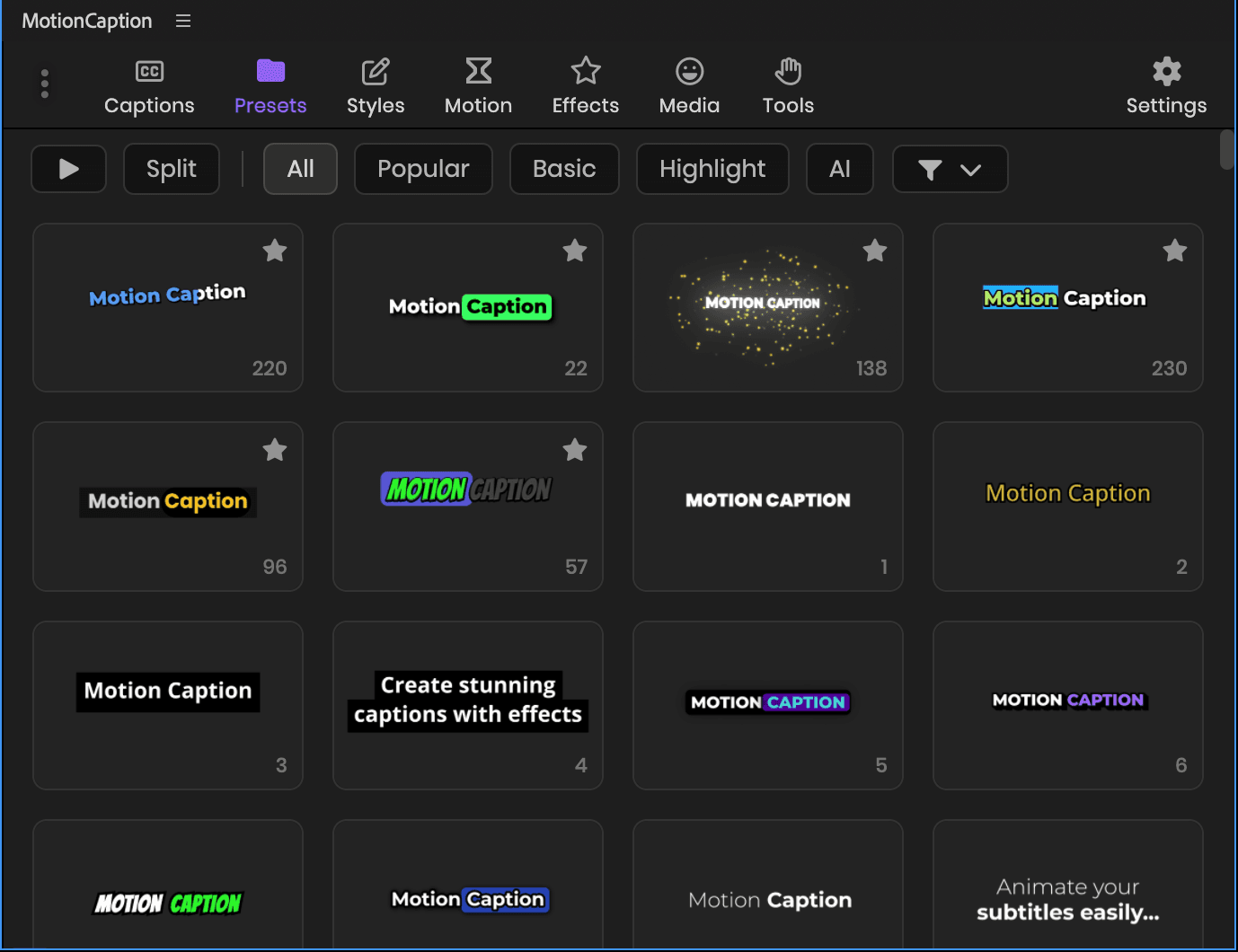
Preset library

Animated caption presets
with editable styles

Native After Effects text layers. Start from a preset, then make it yours.

The most used presets by the MotionCaption community.

Mostly inspired by short-form looks on Reels, TikTok, and YouTube Shorts.

How captions land

A preset is the look. This is the layer it arrives on, and what you can generate instead of picking one.

After Effects

Every preset builds native After Effects text layers.

Text Layer

Plain native text layers, fully editable. Split them per word, per line, or per caption, or keep everything on one layer.

Your Custom Composition

Use your own After Effects composition as the caption look, instead of picking from the library.

Premiere

Every preset rides on one MotionCaption MoGRT.

One MoGRT for all captions

Every caption rides on a single MoGRT clip, so generation is fast and the timeline stays light. Each caption can still have its own style.

Premiere Captions

Turn the same captions into a native Premiere caption track, the kind viewers can switch on and off.

One click, captions on your timeline

Pick a preset and apply. MotionCaption builds animated captions from your transcript and drops them on your timeline. In After Effects, every caption is a native text layer you can edit.

See the captions panel
MotionCaption · Apply
MotionCaption · Preset settings

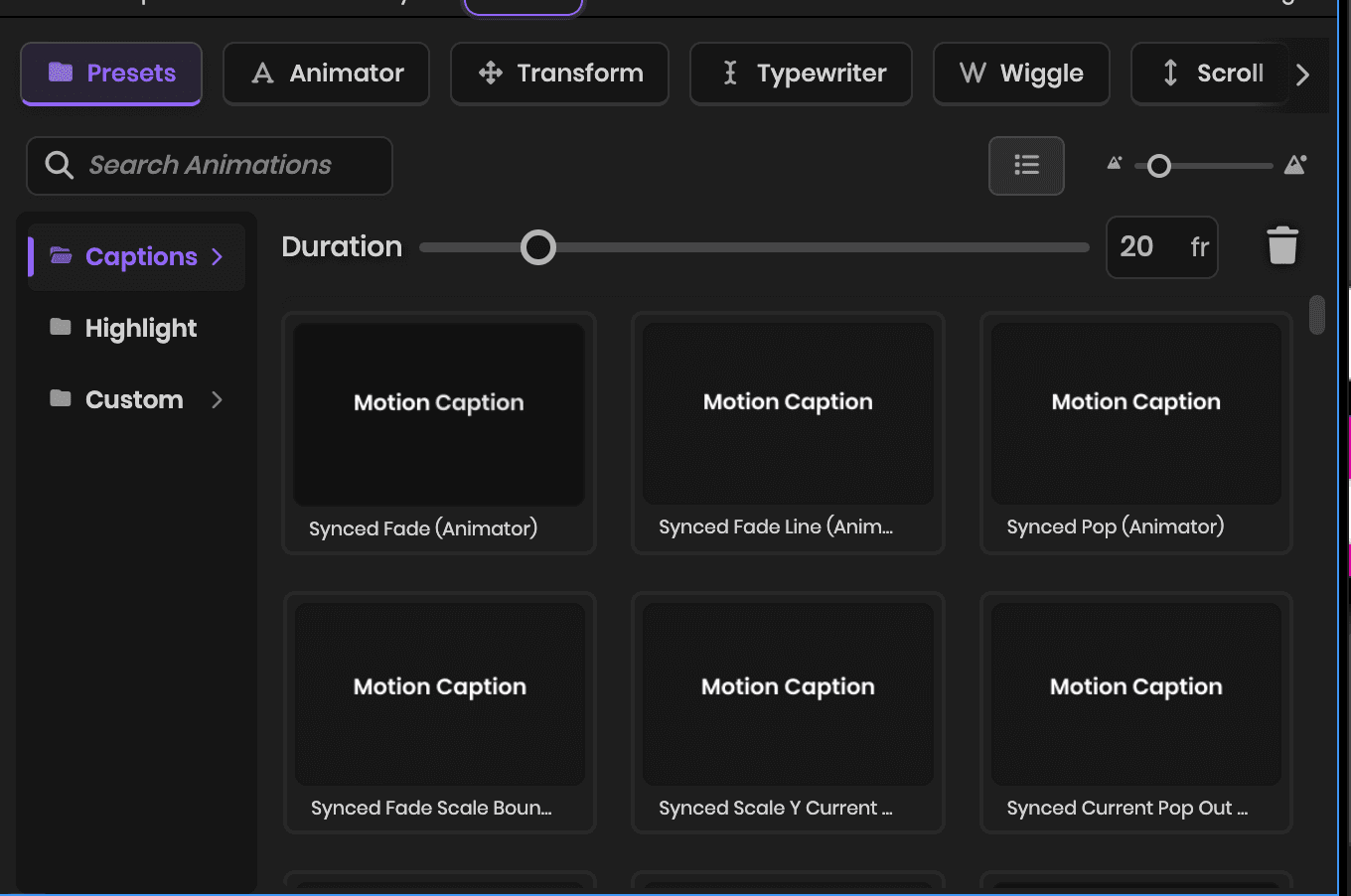
Make it yours, then reuse it

Change colors, fonts, boxes, and timing, then save it as your style. Next time, one click brings your look back.

See more

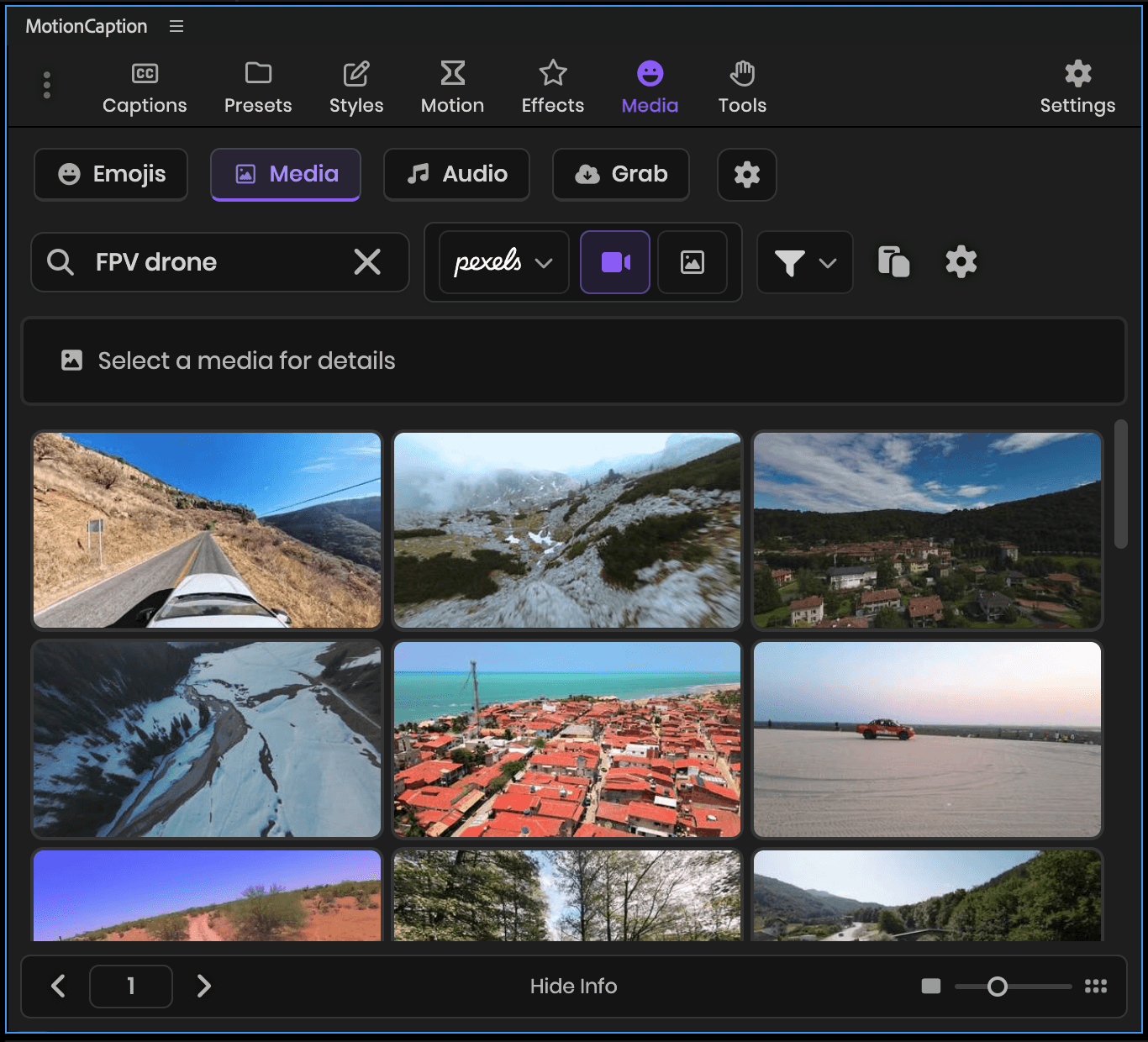
Drop media right on your playhead

Add stock clips Pro, your own footage, icons, and emojis. They land at the playhead, positioned and scaled, ready to go.

What is included
MotionCaption · Media
Cleanup, AI & stock, in the panel

Creative Tools

The cloud AI runs on credits, and one credit transcribes a minute of audio. Any paid plan can spend them. Pro adds 800 credits a month.

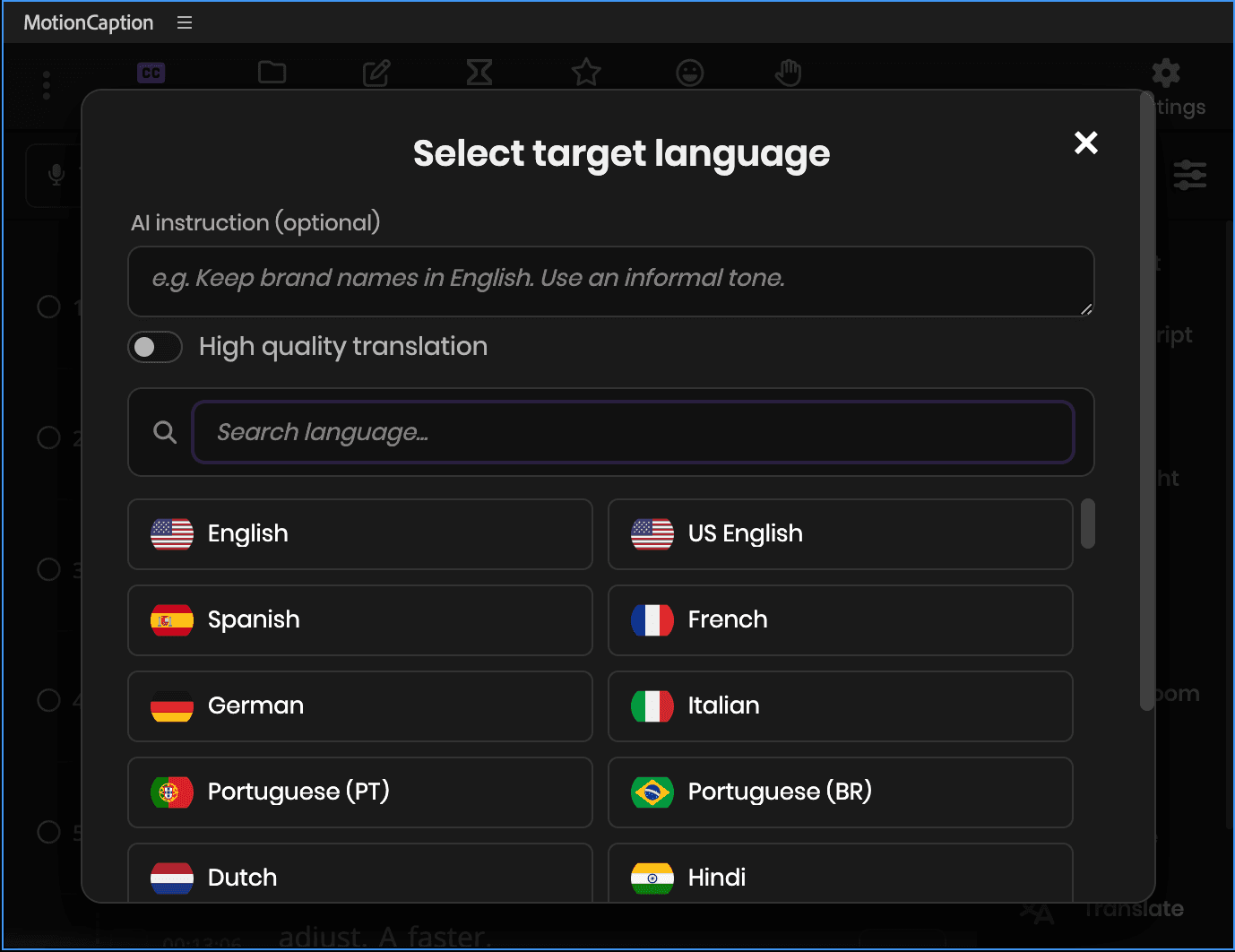
Accurate transcripts, 100+ languages

Cloud transcription puts a timestamp on every word and separates two speakers when you turn that on. It costs 1 AI credit per minute of audio. Local Whisper runs on your own machine, offline, and spends no credits.

English
Spanish
French
German
Italian
Portuguese
Dutch
Hindi
Japanese
Chinese
Finnish
Korean
Polish
Russian
Turkish
Ukrainian
Vietnamese
Afrikaans
Albanian
Amharic
Arabic
Armenian
Assamese
Azerbaijani
Bashkir
Basque
Belarusian
Bengali
Bosnian
Breton
Bulgarian
Burmese
Catalan
Croatian
Czech
Danish
Estonian
Faroese
Galician
Georgian
Greek
Gujarati
Haitian
Hausa
Hawaiian
Hebrew
Hungarian
Icelandic
Indonesian
Javanese
Kannada
Kazakh
Khmer
Lao
Latin
Latvian
Lingala
Lithuanian
Luxembourgish
Macedonian
Malagasy
Malay
Malayalam
Maltese
Maori
Marathi
Mongolian
Nepali
Norwegian
Norwegian Nynorsk
Occitan
Panjabi
Pashto
Persian
Romanian
Sanskrit
Serbian
Shona
Sindhi
Sinhala
Slovak
Slovenian
Somali
Sundanese
Swahili
Swedish
Tagalog
Tajik
Tamil
Tatar
Telugu
Thai
Tibetan
Turkmen
Urdu
Uzbek
Welsh
Yiddish
Yoruba
100+ languages supported

Reach viewers in 100+ languages

Translate all captions to 100+ languages with cloud AI.

ES00:00Anima tus subtítulos
ES00:03como un profesional
ES00:07Crea subtítulos
ES00:11increíbles con efectos
ES00:15Guarda y personaliza tu estilo

Auto Zoom

AI punches in on the moments worth emphasizing, from Calm to Energetic. Or set zooms yourself from markers or cuts. Manual zooms use zero AI credits.

150%Anchor
Energy
CalmBalancedEnergetic

Fix formatting across the whole transcript

AI fixes line breaks and caption length across the whole transcript. Merge short lines, split long ones, or write your own rule.

Layout
Merge very short captions
Split over-long captions
Rebalance line breaks
Text
Merge words
Fix grammar
ProfanityKeep
Pro

Pexels, Pixabay & Openverse

Search photos and videos on Pexels and Pixabay, and royalty-free audio on Openverse, then insert from the panel.

Search Pexels (Videos)…
3840 × 2160
0:14
0:22

B-roll matched to every line

AI reads your captions and suggests B-roll for each line. Preview the matches, then insert the clip you want.

Suggested B-rollSelect all
1/12
0:02 – 0:06

We hiked up before sunrise

1/12
0:10 – 0:14

The whole city was still asleep

Cancel
Pro

AI Presets

One click applies emoji suggestions, highlight colors, and supersized key words.

AllPopularHighlightAI
AI preset 236236
AI preset 237237
AI preset 238238
AI preset 246246
AI preset 250250
AI preset 298298
AI preset 263263
AI preset 318318
AI preset 334334
AI preset 335335
AI preset 337337
AI preset 338338
AI preset 339339

AI Chapters

Generate chapter timestamps in one click. Copy them for your description, or pick a title template to drop each chapter name on your timeline at its time.

ChaptersCopy
1Introduction0:00
2Adding Captions1:23
3Styling Tips3:47
Title template · adds to your timeline
Chapter
Lower Third
Chapter
Pill Badge
Chapter
Minimal

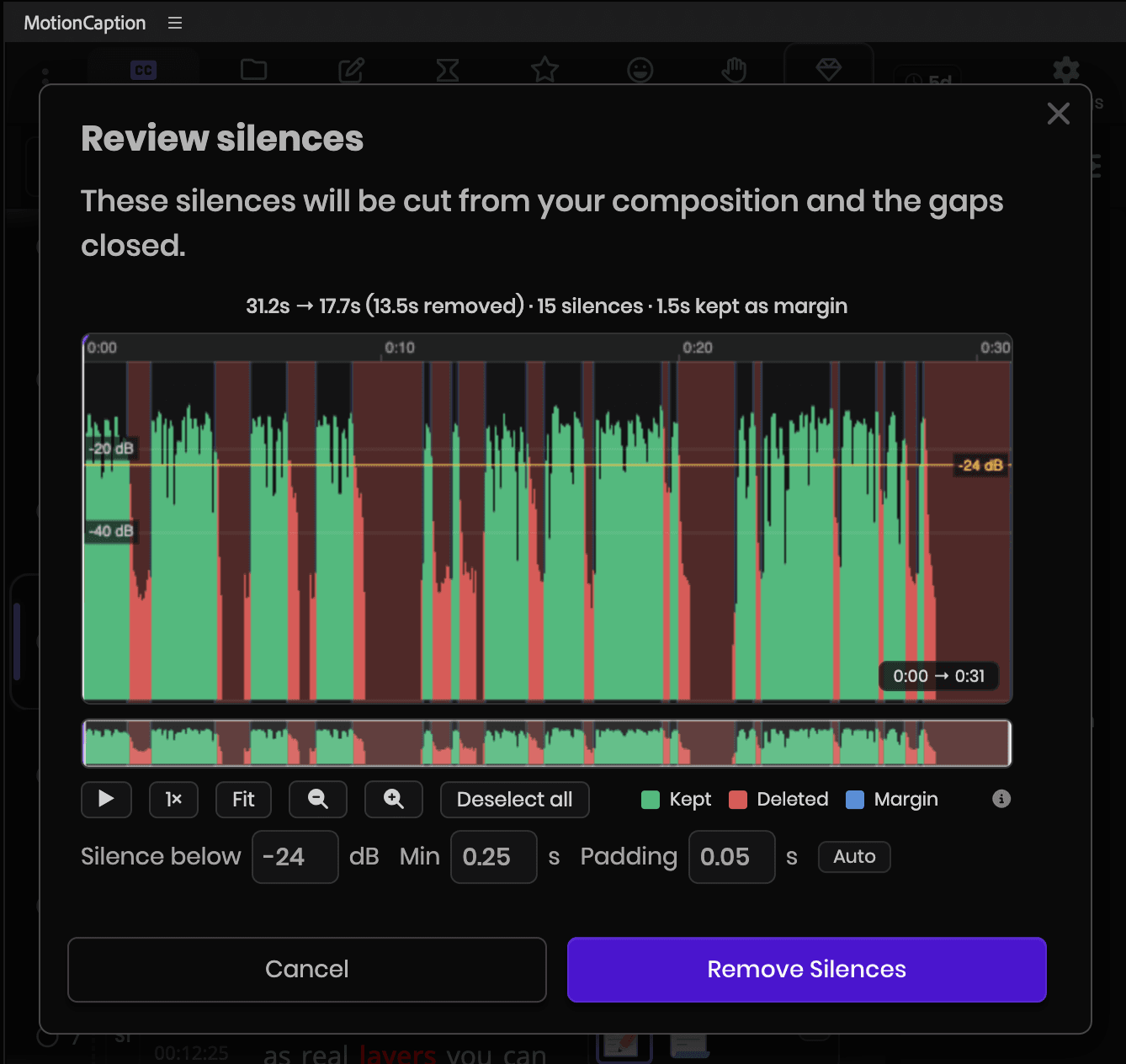
Clean up your audio

Cut silences, filler words, and repeated takes, then close the gaps. Review every cut on the waveform first. Silences and caption-based detection are free on any plan. Detecting filler and repeats from raw timeline audio uses cloud transcription credits.

Review silences4 silences · 3.8s to cut
Kept RemovedSilence below -52 dB

AI emoji suggestions

AI reads your captions and suggests emojis for each caption. Select the one you want.

Emoji suggestionsSuggest all
3S1
0:040:06

This view is unreal

🤩😍
4S1
0:070:09

We made it to the top

🚀🏔️
5S1
0:100:12

Best coffee in town

🔥

Post-ready titles and descriptions

Generate titles, descriptions, and hashtags for TikTok, Instagram, and YouTube from your captions. Copy what you need and paste it in.

TikTok
Title · 1/3

Animate subtitles like a pro!

Description

Learn how to create stunning animated subtitles with effects. Customize and save your favorite styles!

Instagram
Title · 1/3

Bring your subtitles to life with motion!

Description

#motioncaption #captiondesign #subtitleanimation #videocreator #contenttips

YouTube
Title · 1/3

How to Animate Subtitles Easily with Motion Caption

Description

This video shows you how to animate your subtitles easily using Motion Caption. Learn to create stunning captions with effects, save styles, and customize.

Both apps

330+ presets in After Effects. 80+ in Premiere.

Switch apps to see what arrives on your timeline.

After Effects
After Effects
Native text layers
Deepest experience

Captions land as real After Effects text layers.

  • 330+ animated caption presets to start from
  • Style with fonts, colors, boxes, highlights, and effects
  • Add animations, transitions, and filters
  • Put every caption on one layer, or split by caption, line, or word
  • Use your own composition as the caption look
  • Generate new looks whenever you want with the Style Generator, 12 at a time, and save the ones you like
After Effects output

One layer per caption block. The usual starting point, and most presets work with it.

Adobe After Effects 2026

Create stunning

captions easily

Layer
4Caption 1
3Caption 2
2Caption 3
1Caption 4
One install

What's in the toolkit

The full set, from transcription to final polish.

330+ caption presets (After Effects), 80+ on one clip (Premiere)
150+ Text & Layer Styles
90+ Text Animations
50+ Effects
25+ Transitions
30+ B-Roll Transitions
50+ Color Filters
14 Highlight Presets
Auto Zoom (punch-in zooms)
Supersize (enlarge key words)
Chapters
Emoji Animations
Fast Editing Captions
Save and reuse styles, animations, and effects (After Effects)
Project and folder media
Emojis (Google, Google Animated, X)
17,300+ icons (13 libraries)
Pro: Multiple AI features
Pro: Stock media (Pexels, Pixabay, Openverse)
Pro: AI B-roll suggestions
Custom Style Creator
Easing Editor
Time-saving tools
One clip for the whole caption track, or split per caption (Premiere)
Batch Add Animations
Two-speaker support
SRT/TXT/CSV import
Grab Media (paste a media link)
Local Whisper (offline)
SRT & plain text export
Custom Fonts
Word-level sync to speech (each word timed)
Retime: frame-accurate, word by word
Restyle any word after generating (After Effects)
Pro: AI translation (100+ languages)
Remove Silences
Remove Repetitions
Remove Filler Words
See all features

Old way vs MotionCaption

After Effects has no captions built in, and Premiere's stop at one word-by-word style. MotionCaption builds them from your audio in a few clicks.

Without MotionCaption
Hours
of tedious, manual keyframing
Create a text layer for every word
Keyframe every animation by hand
Sync timing to audio manually
Redo everything if the edit changes
Slow, tedious work for one video
With MotionCaption
Minutes
from audio to animated captions
Captions land from your audio automatically
Animation comes ready to play
Word timing follows the speech for you
Format captions in seconds
Emojis, highlights, and zoom, built in

Start your free trial

Free for 7 days, no credit card.

Use cases

Captions for every kind of video

Wherever you publish, your captions match the look and pacing of your video.

Short-form social

Reels, TikToks, and Shorts that hook viewers in the first second.

Long-form video

Keep watch time high with clear, styled captions on every line.

Courses and tutorials

Make lessons easy to follow, even with the sound off.

Podcasts

Cut the dead air, the ums, and the takes you said twice, then caption what is left.

Ads and promos

On-brand captions that carry your message without sound.

Interviews

Clean, readable captions for talking-head and interview footage.

Plans

Start free. Own it or go Pro.

Free for 7 days. Then pay once and own it, or go Pro for AI.

Free Trial
$0
7 days, no credit card
  • Core features + Pro cloud AI for 7 days
  • No credit card required
  • 50 AI credits to start, about 50 minutes of cloud transcription
Start Free Trial
MotionCaption
$149$99
One-time payment · Lifetime access

Launch price until August 31

  • 330+ animated caption presets (After Effects). A few marked Pro need a subscription
  • 80+ animated caption presets in Premiere, all on one MotionCaption MoGRT
  • All core captioning features, styles, and workflow tools
  • Unlimited transcription on your machine, offline, no credits
  • Emojis + 17,300+ icons (13 libraries)
  • Motion toolkit: 150+ styles, 90+ text animations, 50+ effects, 25+ transitions, 30+ B-roll transitions, 50+ color filters, and 14 highlight presets, and your own saved presets
  • Auto Zoom: punch-in zooms from markers or cuts
  • Chapters: add manually, copy YouTube timestamps, markers & on-screen titles
  • 150 AI credits included, one time: about 2.5 hours of cloud transcription, or roughly 18 one-minute shorts with the full AI treatment
  • Project media & folder browser
  • 2 devices (add more for $6/mo per seat)
  • Free updates for 1 year, then $24.99/year to keep getting new versions
  • Priority support during your update window
Own it

14-day money-back · Secure Stripe checkout

Best for AI
MotionCaption Pro
$12/mo
$144/year, billed annually
2 months free
  • Everything in MotionCaption, plus a monthly AI budget:
  • 800 AI credits a month to run the cloud AIThat's ~100 one-minute shorts with the full AI treatment, or 13+ hours of cloud transcription. Most of the AI tools below also run on the one-time plan while you hold credits. Stock media, AI B-roll, and AI-powered presets need an active Pro plan.
  • AI cloud transcription
  • AI translation (100+ languages)
  • AI highlights and formatting
  • AI emoji suggestions
  • AI B-roll suggestions
  • Stock media: Pexels, Pixabay, Openverse
  • AI Auto Zoom suggestions
  • AI supersize (enlarge key words)
  • AI chapters (auto-detect from your transcript)
  • AI titles and descriptions for social posts
  • AI-powered presets
  • Always latest extension version
Subscribe
Need more AI usage?

Credit packs start at $4.99 for 200 credits, about 3.3 hours of cloud transcription. Buy them from your account once you own MotionCaption or subscribe to Pro.

Buy it once. It stays yours.

The captioning tools are a one-time purchase. Pro is an add-on for cloud AI and stock media, on for a busy month and off again.

FAQ

Frequently Asked Questions

Everything you need to know before getting started.

Yes. MotionCaption works inside both After Effects (2023+) and Premiere (2023+). A few After Effects presets and tools require After Effects 24.3 or later.

No. 330+ animated caption presets (After Effects). 80+ animated caption presets in Premiere, all on one MotionCaption MoGRT. In Premiere every caption rides on one clip, so generation is fast and the timeline stays light, and you can split that clip to style any caption on its own. After Effects carries the larger library of presets, animations, effects, transitions, styles, and highlights.

No. The panel looks the same in both, and Premiere uses a MoGRT. In Premiere you get 80+ caption presets, any MoGRT you build yourself, text styles, boxes, highlights, animations, effects, and a one-click PNG bake for instant preview. Some features are After Effects only, including B-roll transitions, layer styles, User Presets, the palette manager, the easing editor, and the batch tools for caption layers. The caption work itself all runs in Premiere: transcription, presets, text styles, highlights, emojis, Auto Zoom, and Retime. You can also bring your own MoGRT and caption with it.

They are good tools built for a different workflow. CapCut and Submagic run in the browser or their own app, so your video leaves your edit and comes back as a finished file with the captions baked into the picture. MotionCaption runs inside After Effects and Premiere, so captions arrive on the timeline where you already work. In After Effects they are native text layers, so you can restyle, retime, and animate them with anything After Effects offers. In Premiere they come as a MoGRT, which keeps the whole caption track on one clip, so the timeline stays light and captions land fast. Split that clip whenever you want a caption styled on its own, or bake the track to a PNG sequence for instant playback. Pricing works differently too. MotionCaption is a one-time purchase for the core features, with an optional Pro subscription for the cloud AI tools.

See the full comparison

Yes. Only emojis, media libraries, and AI features (cloud transcription, emoji suggestions, translation, etc.) require an internet connection.

MotionCaption is a paid plugin with a free trial. The trial lasts 7 days, needs no credit card, and includes 50 AI credits so you can try the cloud AI tools. After that, buy MotionCaption once and keep the core features for life, or subscribe to Pro for cloud AI and stock media. Every purchase comes with a 14-day money-back guarantee.

Your projects and any styles you saved stay in your After Effects and Premiere files. To keep using the panel, buy MotionCaption (one-time) for core captioning, or subscribe to Pro for cloud AI and stock media.

Credits only pay for cloud AI features. The caption workflow itself is unlimited: presets, styles, animations, effects, editing, retiming, and local Whisper transcription all run with no credits on a one-time license. Cloud transcription is billed one credit per minute of audio, so a 10-minute video costs 10 credits and a full hour costs 60. Other AI features start at one credit and scale with how much you process. For example, AI highlight uses about one credit per 120 words. The panel always shows an estimate and asks you to confirm before any large spend. Stock search is included with Pro and uses zero AI credits. Pro includes 800 AI credits per month. Buy AI credit packs anytime you need more.

MotionCaption (one-time) comes with 150 AI credits, about 2.5 hours of cloud transcription or roughly 18 one-minute shorts with the full AI treatment. That grant is one time and does not renew each month. After it, top up with credit packs from $4.99 for 200 credits, or subscribe to Pro for 800 credits a month. The rest of the plugin needs no credits at all: offline Whisper transcription, every caption preset, styles, animations, effects, and retiming stay unlimited for life. Stock media search is the one extra that needs Pro.

The one-time purchase includes 1 year of updates and priority support. After that, $24.99 a year keeps new versions and priority support coming, and it is optional. The licence itself never expires: if you stop renewing, the version you own keeps working and you can renew again whenever you want. Pro subscribers always get the latest version while the subscription is active. MotionCaption runs on After Effects 2023 or newer and Premiere 2023 or newer, on Windows and macOS.

Accuracy depends on your audio, so the honest answer is a range rather than a single published number. Here is what you do get: cloud transcription in 100+ languages, a timestamp on every word, and two-speaker separation when you tick Separate speakers. Every word stays editable in the panel afterwards, and the Retime timeline snaps each word to a frame, so fixing the few words any transcriber gets wrong takes seconds. Cloud transcription costs 1 AI credit per minute of audio. Local Whisper runs offline on your own machine and spends no credits.

Yes. Presets include settings you can edit and save, such as text styles, highlights, backgrounds, animations, effects, transitions and more. In After Effects you get native text layers with full layer control. In Premiere, captions use a MoGRT with a wide set of style controls, and you can also load a MoGRT you built yourself and caption with that. A MoGRT exposes a fixed set of controls, so After Effects still goes deeper.

Heavier projects take longer to generate. For long videos, generate captions in a new or lighter project to keep it fast.

Yes. Your license runs on up to 2 devices at once. Open MotionCaption on the device you no longer use and click Deactivate, then activate on the new device with the same license. If you no longer have access to the old machine, contact support and we will reset your activations for you.

14-day money-back guarantee. Send a message through the contact form within 14 days of purchase and we'll refund you in full. Want to confirm fit first? Start the free trial, no card needed.

Still have questions? Read the full guide.

Browse the guide
Start free today

Your next video, captioned in minutes.

Start Free Trial

No credit card required. Buy once, no subscription.